
Connecting Matter-over-Thread Devices to the Internet
While it has taken longer than some people expected, Matter is finally going mainstream. Brands including Ikea, Kwikset, and Bosch have shipped matter devices, and matter hubs can increasingly be found in people’s homes.
Many dev kits out there are matter compatible, and if you want to build a simple application you can find good example code and get started quickly. This is fine if your use case fits neatly within existing Matter clusters, but direct internet communication is not straightforward.
In this post, we look at how a Matter-over-Thread device can reach the internet through a Thread Border Router. We will cover the key networking concepts (Thread, NAT64, and UDP) and walk through a working example that sends a UDP message from an nRF54LM20 DK to an echo server on the public internet.
Table of Contents
A Brief Introduction to Matter
Matter1 is an application-layer protocol for smart home devices. It was developed by the Connectivity Standards Alliance (CSA), with backing from Apple, Google, Amazon, and others. The goal is interoperability: a Matter light bulb works with any Matter controller, regardless of the ecosystem.
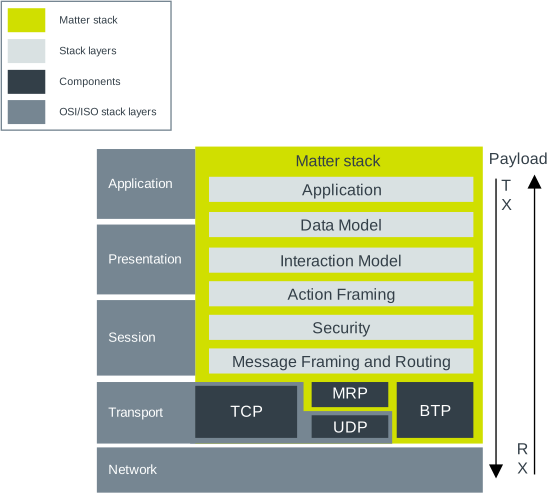
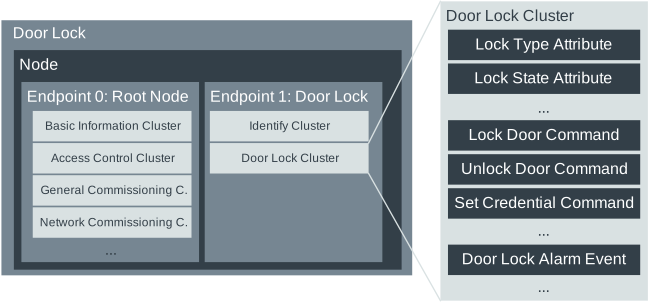
Matter defines a data model (clusters, attributes, commands) and the networking stack to carry it. Devices are commissioned into a fabric (a logical network of controllers and devices), and from that point on, controllers can read attributes, send commands, and subscribe to changes.
Matter’s Networking Stack
Under the hood, Matter runs on IPv6 over either Wi-Fi or Thread. For battery-powered and low-power devices, Thread is the typical choice.
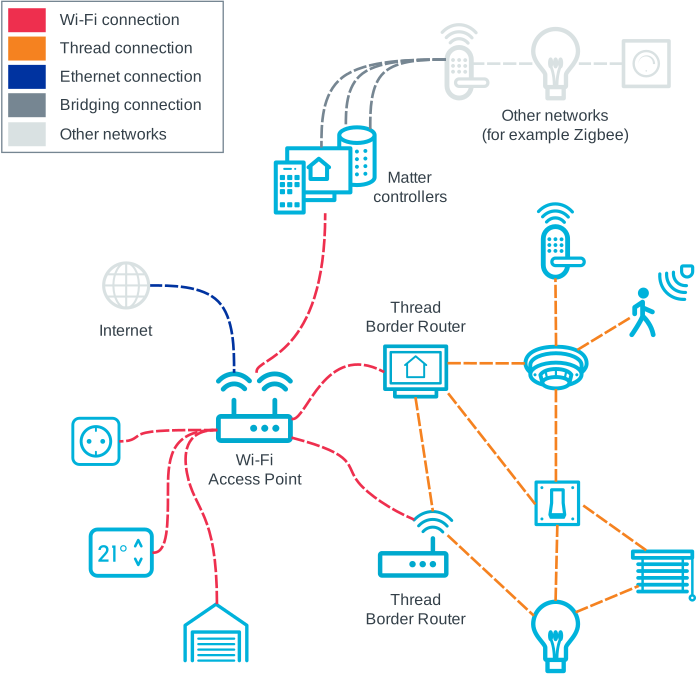
Thread2 is a low-power mesh networking protocol built on top of IEEE 802.15.4 (the same radio layer as Zigbee). It provides IPv6 addressing, mesh routing, and secure commissioning. Crucially, Thread networks include a Border Router, a device that bridges traffic between the Thread mesh and the wider IP network (typically your home Wi-Fi/Ethernet).
Matter does not use TCP. Instead, it runs on UDP and adds its own reliability and encryption on top through the Matter Reliable Protocol (MRP) and a custom security layer (CASE/PASE sessions with AES-CCM encryption).
Note: Matter 1.5 adds TCP support to the standard, but it remains to be seen how this will be implemented in practice.
The Hub Does Most of the Work
Matter is designed so that devices rarely need to talk directly to the internet. Instead, internet-facing communication is delegated to the controller (the hub).
A good example is firmware updates. Matter devices do not check a server directly for updates. Instead, manufacturers publish their update on the Distributed Compliance Ledger (DCL)3, a blockchain (yes! blockchain!) managed by the CSA. Devices regularly ask their hub for updates, and the hub in turn goes and checks the DCL. If a new update is found on the DCL, the hub downloads it and sends it to the device using a standardized Matter cluster (i.e. message format).
This is true for most Matter operations: device control, event reporting, and scene management all happen locally. The controller handles cloud integration, voice assistant bridges, and remote access.
Reaching the Internet
But sometimes local-only communication is not enough. You may want to:
- Send telemetry data to a cloud backend
- Pull a firmware update directly from your backend rather than the DCL
- Reach a custom server for functionality outside the Matter spec
In theory, Matter hubs are full-fledged Thread Border Routers and should be able to bridge traffic from the Thread mesh to the internet.
One does not simply send IPv6 packets
Since Thread is an IPv6 network, you might wonder: why not just send packets to the server’s IPv6 address directly?
The short answer is that Thread devices typically do not have globally routable
IPv6 addresses. The addresses assigned within a Thread mesh are either
link-local (fe80::) or mesh-local (fd::), neither of which is routable on
the public internet. For a device to send IPv6 traffic directly to an internet
server, it would need a Global Unicast Address (GUA), and the Border Router
would need to route that prefix into the mesh.
Most Thread Border Routers do not enable this. Apple’s HomePod, for example, does not assign GUAs to Thread devices. Some other Border Router implementations might, but it is not common today.
We need a different solution.
Enter NAT64
Thread 1.4 introduced NAT64, a network address translation mechanism that allows IPv6-only clients to communicate with IPv4-only servers.
Here is how it works:
- The device resolves a hostname using the Thread network’s DNS server (provided by the Border Router). When resolving an A record (IPv4), the DNS client synthesizes an IPv6 address by embedding the IPv4 address within a well-known NAT64 prefix.
- The device sends its UDP packet to that synthesized IPv6 address.
- The Border Router recognizes the NAT64 prefix, extracts the IPv4 address, and forwards the packet to the IPv4 destination on the internet.
- The reply comes back through the same path in reverse.
From the device’s perspective, it is sending data to an IPv6 address. The NAT64 translation is transparent.
Note: Not every Thread Border Router supports NAT64. Apple devices (HomePod mini, Apple TV 4K) do support it. NAT64 is a requirement in the Thread 1.4 specification4, so support will improve as more hubs receive updates.
Sending data over UDP
Since Matter runs on UDP over Thread, there are a few constraints to keep in mind:
- UDP only. Since TCP is not compatible with Matter, we get no HTTP, no HTTPS, no WebSockets.
- Small effective payload. Thread runs IPv6 over IEEE 802.15.4, which has very small MAC frames (127 bytes) and relies on 6LoWPAN fragmentation to carry the IPv6 minimum MTU of 1280 bytes. In practice, after headers and considering fragmentation overhead, you should assume your reliable UDP payload budget per message is well under 1200 bytes.
- No TLS. TLS requires TCP. For encrypted communication, you need DTLS (Datagram TLS), which is the UDP equivalent.
This complicates our life a bit, as it means we cannot simply talk to our backend over HTTP (which depends on TCP). We’ll get to that in a bit.
End-to-end data path
Putting everything we’ve learned together, here’s how a UDP packet from a Matter device gets to a server on the internet:
┌─────────────┐    802.15.4    ┌───────────────────┐    Wi-Fi/Ethernet  ┌──────────┐
│ Matter      │ ─── Thread ──> │ Border Router     │ ──── NAT64 ──────> │  Cloud   │
│ Device      │    (IPv6/UDP)  │ (e.g. HomePod)    │   (IPv6 to IPv4)   │  Server  │
│ (nRF54LM20) │                │                   │                    │          │
└─────────────┘                └───────────────────┘                    └──────────┘
- The application builds a UDP packet and hands it to the OpenThread stack.
- OpenThread encapsulates it for 802.15.4, which encrypts each frame at the MAC layer (AES-128-CCM) before transmitting over the air.
- The Border Router receives the 802.15.4 frame, decapsulates it, and sees a UDP/IPv6 packet destined for a NAT64 address.
- The Border Router performs NAT64 translation and forwards the packet as UDP/IPv4 to the destination server.
- The server replies, and the process reverses.
nRF54LM20 Example: UDP Echo
Let’s put this into practice. We will send a UDP message from an nRF54LM20 DK through a HomePod Border Router to Nordic Semiconductor’s public echo server found at udp-echo.nordicsemi.academy:2444, and receive the response.
The nRF54LM205 is a good fit for Matter. It has an ARM Cortex-M33 at 128 MHz, 2 MB of NVM (it’s actually RRAM, not flash, which is pretty cool) and 512 KB of RAM, which is plenty of headroom for the Matter stack, OpenThread, and application code. It supports both BLE (for commissioning) and 802.15.4 (for Thread).
Let’s grab a nRF54LM20 Dev Kit6, the latest of the nRF Connect SDK7 and start writing some code!
Project Setup
We set up NCS and started from the Matter template sample (samples/matter/template). You can learn more about setting up NCS in Nordic’s excellent documentation.
We need to toggle a few KConfig to get things working in our example:
# prj.conf

# Enable Matter
CONFIG_CHIP=y

# OpenThread DNS client (for resolving hostnames via Thread network)
CONFIG_OPENTHREAD_DNS_CLIENT=y

# Shell support (for our echo commands)
CONFIG_CHIP_LIB_SHELL=y
CONFIG_OPENTHREAD_SHELL=y
CONFIG_OPENTHREAD_DNS_CLIENT=y is the important one. It enables the DNS client
in the OpenThread stack, which allows us to resolve hostnames using the Border
Router’s DNS proxy. Without it, you would have to hardcode IP addresses.
DNS Resolution
Before we can send a UDP packet, we need to resolve the echo server’s address. OpenThread provides a DNS client API that sends queries through the Border Router’s DNS proxy.
For NAT64, we resolve the A record (IPv4) using otDnsClientResolveIp4Address.
The OpenThread DNS client automatically synthesizes a NAT64 IPv6 address from
the result:
#include <openthread/dns_client.h>
#include <openthread/nat64.h>

#define ECHO_SERVER_HOST "udp-echo.nordicsemi.academy"

static K_SEM_DEFINE(dns_sem, 0, 1);
static otIp6Address resolved_addr;
static bool dns_resolved_ok;

static void dns_resolve_cb(otError aError,
                           const otDnsAddressResponse *aResponse,
                           void *aContext)
{
    if (aError != OT_ERROR_NONE) {
        dns_resolved_ok = false;
        k_sem_give(&dns_sem);
        return;
    }

    uint32_t ttl;
    otError err = otDnsAddressResponseGetAddress(aResponse, 0,
                                                  &resolved_addr, &ttl);
    dns_resolved_ok = (err == OT_ERROR_NONE);
    k_sem_give(&dns_sem);
}

static bool resolve_echo_server(otInstance *instance)
{
    k_sem_reset(&dns_sem);
    dns_resolved_ok = false;

    openthread_mutex_lock();
    otError err = otDnsClientResolveIp4Address(
        instance, ECHO_SERVER_HOST, dns_resolve_cb, NULL, NULL);
    openthread_mutex_unlock();

    if (err != OT_ERROR_NONE) {
        return false;
    }

    if (k_sem_take(&dns_sem, K_SECONDS(10)) != 0) {
        return false;
    }

    return dns_resolved_ok;
}
The DNS resolution is asynchronous. We use a semaphore to block until the
callback fires. On success, resolved_addr contains a synthesized IPv6 address
that embeds the server’s IPv4 address with the Border Router’s NAT64 prefix.
Note: In my testing with a HomePod mini, the DNS proxy could not follow CNAME chains for certain hostnames. If DNS resolution fails, you can fall back to a hardcoded IPv4 address and synthesize the NAT64 address manually using
otNat64SynthesizeIp6Address.
Sending and Receiving UDP
With the address resolved, we can open a UDP socket and send a message. We use the OpenThread native UDP API rather than Zephyr’s socket API. The OpenThread stack is already quite large, so we save some code space by not having to pull the full Zephyr networking stack alongside it.
Here’s what it looks like:
#include <openthread/udp.h>
#include <openthread/message.h>

#define ECHO_SERVER_PORT 2444
#define RECV_TIMEOUT_MS  5000

static K_SEM_DEFINE(udp_recv_sem, 0, 1);
static char udp_recv_buf[256];
static int udp_recv_len;

static void udp_receive_cb(void *aContext, otMessage *aMessage,
                            const otMessageInfo *aMessageInfo)
{
    uint16_t offset = otMessageGetOffset(aMessage);
    uint16_t length = otMessageGetLength(aMessage) - offset;

    if (length > sizeof(udp_recv_buf) - 1) {
        length = sizeof(udp_recv_buf) - 1;
    }

    udp_recv_len = otMessageRead(aMessage, offset,
                                  udp_recv_buf, length);
    udp_recv_buf[udp_recv_len] = '\0';
    k_sem_give(&udp_recv_sem);
}

static int send_udp(otInstance *instance,
                     const otIp6Address *addr,
                     const char *msg)
{
    otUdpSocket socket;
    otSockAddr bind_addr;
    otMessageInfo msg_info;
    otMessage *ot_msg;
    otError err;

    /* Open and bind a UDP socket */
    memset(&socket, 0, sizeof(socket));
    openthread_mutex_lock();

    err = otUdpOpen(instance, &socket, udp_receive_cb, NULL);
    if (err != OT_ERROR_NONE) {
        openthread_mutex_unlock();
        return -1;
    }

    memset(&bind_addr, 0, sizeof(bind_addr));
    otUdpBind(instance, &socket, &bind_addr, OT_NETIF_THREAD);

    /* Allocate and populate a message buffer */
    ot_msg = otUdpNewMessage(instance, NULL);
    if (!ot_msg) {
        otUdpClose(instance, &socket);
        openthread_mutex_unlock();
        return -1;
    }

    otMessageAppend(ot_msg, msg, (uint16_t)strlen(msg));

    /* Set destination and send */
    memset(&msg_info, 0, sizeof(msg_info));
    msg_info.mPeerAddr = *addr;
    msg_info.mPeerPort = ECHO_SERVER_PORT;

    k_sem_reset(&udp_recv_sem);
    err = otUdpSend(instance, &socket, ot_msg, &msg_info);
    openthread_mutex_unlock();

    if (err != OT_ERROR_NONE) {
        return -1;
    }

    /* Wait for the echo response */
    if (k_sem_take(&udp_recv_sem, K_MSEC(RECV_TIMEOUT_MS)) == 0) {
        printk("Received: %s\n", udp_recv_buf);
    } else {
        printk("Timeout, no response\n");
    }

    openthread_mutex_lock();
    otUdpClose(instance, &socket);
    openthread_mutex_unlock();

    return 0;
}
A few things to note about the OpenThread UDP API:
-
Mutex discipline. OpenThread is not thread-safe. You must hold the
openthread_mutexwhen calling OT APIs. We release it before blocking on the receive semaphore so the OT thread can process incoming packets. -
Message buffers. OpenThread uses its own message pool (
otMessage), not flat byte arrays. You allocate withotUdpNewMessageand append data withotMessageAppend. The stack takes ownership of the message onotUdpSend, so do not free it yourself. -
Bind to Thread. The
OT_NETIF_THREADparameter inotUdpBindensures the socket is bound to the Thread network interface.
Trying It Out
After building and flashing with west, commission the device into your Thread network using a Matter controller. Look for this log line:
00:00:00.140,606] <inf> chip: [SVR]https://project-chip.github.io/connectedhomeip/qrcode.html?data=xxxxxx
Copy the URL in your browser, and scan the resulting QR code with your favorite Matter ecosystem app (I used Apple Home).
Once commissioned, connect to the UART console and first check that everything is working as expected:
uart:~$ echo status
Thread role: router
  IPv6: fdd7:c450:969a:0:0:ff:fe00:a000
  IPv6: fd7e:67af:9049:1:4ed0:80d4:5675:8326
  IPv6: fdd7:c450:969a:0:76a:9a56:214b:b9dd
  IPv6: fe80:0:0:0:a01c:abda:791a:e404
Next, let’s run our UDP echo test:
uart:~$ echo nat64 "hello from Matter"
Resolving udp-echo.nordicsemi.academy (A via NAT64)...
Sending to [64:ff9b::1452:10a4]:2444
Sent 17 bytes: "hello from Matter"
Received 44 bytes: "1742480123: hello from Matter"
The echo server prepends a timestamp and sends the message back. The address
64:ff9b::1452:10a4 is the NAT64-synthesized IPv6 address, where 1452:10a4 is
20.82.16.164 encoded in hex.
That is a UDP packet originating from a Thread device, traversing the mesh to a HomePod, getting NAT64-translated to IPv4, hitting a server in the cloud, and coming back. All in under a second.
Doing something useful
A plain UDP echo is a good proof of concept, but a real application needs two things on top of raw UDP: a standard communication protocol, and encryption.
CoAP (Constrained Application Protocol)8 is a good fit for the protocol layer. It was designed specifically for constrained devices and low-power networks. Like HTTP, it uses methods (GET, POST, PUT, DELETE) and status codes, so the programming model is familiar. Unlike HTTP, it runs over UDP, uses compact binary headers (typically 4 bytes plus options), and supports confirmable messages with built-in retransmission. It also supports observe (server push) and block-wise transfers for payloads larger than a single MTU.
DTLS (Datagram TLS) handles encryption. It is the UDP equivalent of TLS, providing the same authentication and confidentiality guarantees but designed for datagram transports. The OpenThread stack already includes mbedTLS, so adding DTLS to a Thread application does not require pulling in a new crypto library. In most cases, you’ll want to use DTLS 1.2 with Connection ID (RFC 9146): it lets you resume sessions without a full handshake, which is useful for devices that send data periodically and sleep in between.
Together, CoAP over DTLS gives you a lightweight, encrypted, request/response channel over UDP. This is the same pattern used by LwM2M and other IoT protocols, so there is good tooling and server-side support.
We are big fans of CoAP at nRF Cloud9, and have built support for the protocol across our cloud platform. Device-to-cloud message routing, observability, and location services all support CoAP over DTLS. If you are looking to connect your Thread devices to the internet and want a backend that speaks their language, check it out.
Conclusion
Matter devices are designed to operate within the local network, and the hub handles most internet-facing communication. But when you need to reach the internet directly for telemetry, diagnostics, or custom cloud integration, the Thread Border Router can bridge your traffic.
The recipe we came up with is simple: use the OpenThread DNS client to resolve hostnames via the Border Router’s DNS proxy, NAT64 to reach IPv4 servers, and UDP as the transport. For security, layer DTLS on top and use CoAP as the application protocol.
NAT64 support is not universal today, but it is required in Thread 1.4 and already available on Apple Border Routers. As more hubs get updated, this pattern will become increasingly reliable.
I hope this post gives you a starting point for adding internet connectivity to your Matter devices. As always, we would love to hear about your experience in the comments.
See anything you'd like to change? Submit a pull request or open an issue on our GitHub
References
 François Baldassari has worked on the embedded software teams at Sun, Pebble, and Oculus. He is currently the CEO of Memfault.